How does the buylist work for my customers?
Last updated: October 13, 2026
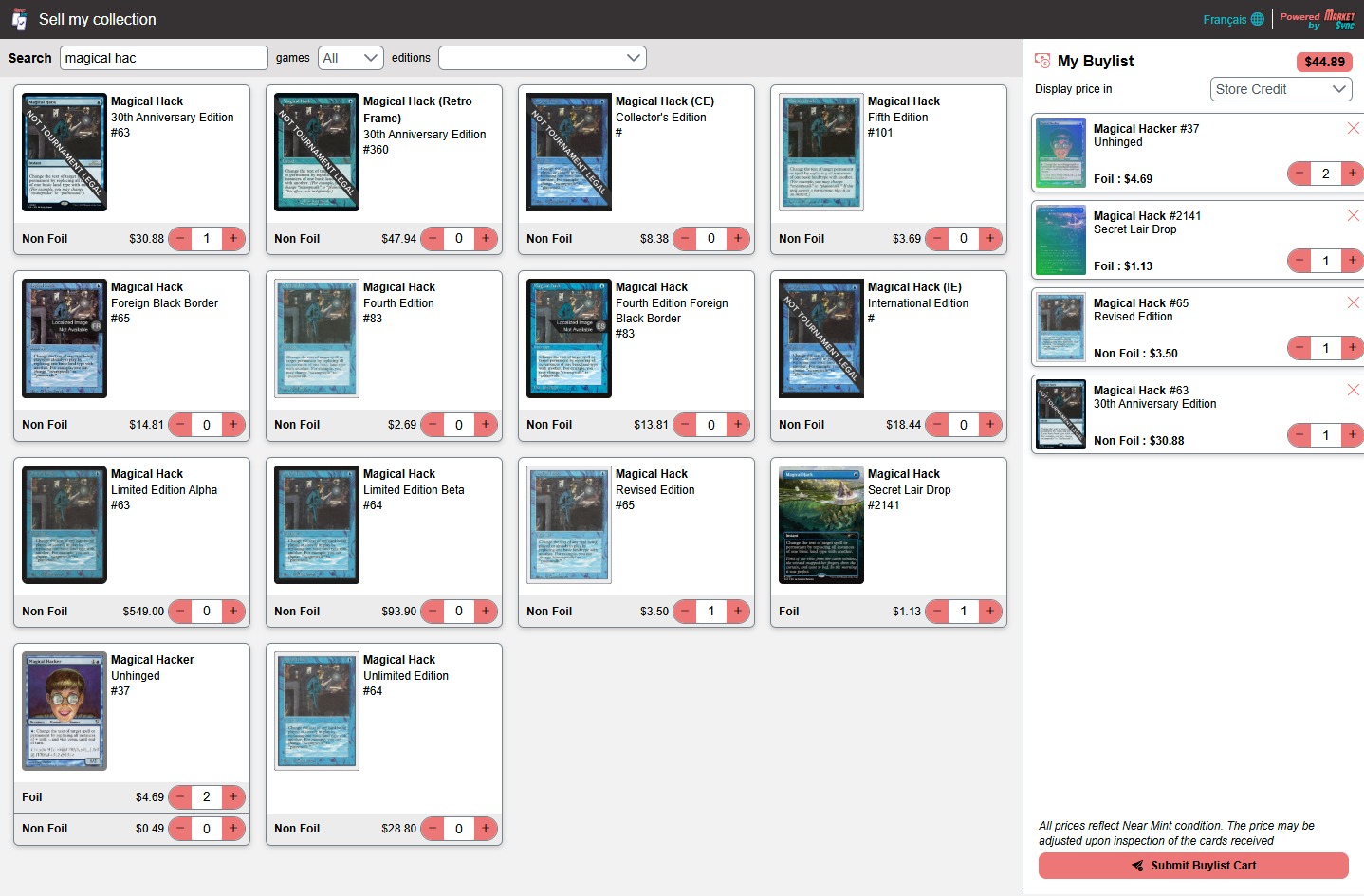
Each store has its own buylist portal, linked from your website. Your customers:
- Sign in with their account on your Shopify store. An account is required, so the buylist and any store credit are attached to the right customer.
- Search for their cards by name or set. They see the price you pay for each card, based on your buylist rules. Cards you don't buy show Purchase unavailable.
- Add cards to their cart, then choose Cash or Store Credit under Display price in. The total updates with your store credit bonus.
- Click Submit Buylist Cart. They receive a confirmation email with a tracking number to follow the status of their buylist.
Why can't customers choose the condition?
- Prices shown to customers are always Near Mint prices. Your team grades the cards once they are in hand, and the customer is notified of any change before accepting. This avoids overly optimistic self grading.
What happens next?
- See What do the buylist statuses mean?.
Other articles that may interest you
Help
Product update: October 2026
Cyberpunk TCG and 4 more games, new POS filters, bulk card creation and a monthly singles inventory report.
FeatureBuylist Management
Buy collections at your price, with an online portal, your own rules and native Shopify store credit.
HelpWhat are the onboarding steps?
An overview of what happens between signing up and selling your first synced card.